Introduction
Artificial intelligence is evolving at an Extraordinary pace, and modern AI systems are becoming increasingly powerful, accurate, and capable every year. Technology companies across the globe are competing to design intelligent models that can understand complex information, automate professional workflows, and assist humans in solving difficult problems.
Among the most influential AI systems in this rapidly advancing ecosystem is Claude 2.1, a sophisticated large language model created by Anthropic. Claude belongs to a family of AI assistants built specifically for safe reasoning, deep comprehension, and enterprise-level applications.
Because of this capability, Claude 2.1 is particularly valuable for professionals who regularly work with large volumes of text, including researchers, analysts, engineers, and legal teams.
In addition to its extended context window, Claude 2.1 also introduced powerful features such as tool use for external integrations, system prompts for developer control, enhanced alignment techniques, and improved API functionality for enterprise deployments.
These innovations have transformed Claude from a simple conversational assistant into a comprehensive AI platform capable of supporting research, automation, analysis, and decision-making.
Today, Claude 2.1 is widely used for tasks such as:
- Document intelligence and analysis
- Software development assistance
- Enterprise workflow automation
- Academic research and literature review
- Data interpretation and reporting
- Long-form content creation
In this comprehensive 2026 guide, we will explore all Claude 2.1 features in depth, explaining how they function, why they matter, and how they compare with earlier models like Claude 2.0.
By the end of this article, you will clearly understand:
- What Claude 2.1 is
- The most powerful Claude 2.1 capabilities
- Practical real-world applications
- Advantages and limitations
- Whether Claude 2.1 is the right AI model for your needs
What Is Claude 2.1?
Claude 2.1 is an advanced large language model (LLM) developed by Anthropic as part of the broader Claude AI ecosystem.
Large language models are artificial intelligence systems trained on enormous datasets that allow them to understand natural language, generate human-like text, interpret complex questions, and perform reasoning tasks.
Unlike basic chatbots that simply provide scripted responses, Claude is designed for knowledge-intensive work, long-document analysis, and professional productivity.
Claude models emphasize safety, interpretability, and reliability, which makes them especially suitable for organizations that require dependable AI tools.
Claude 2.1 builds upon earlier Claude versions by introducing enhanced context capabilities, more advanced developer tools, and stronger safeguards against inaccurate responses.
These improvements position Claude as a leading AI assistant for both individual users and enterprise environments.
Key Design Goals of Claude Models
Anthropic designed Claude models around several core principles that guide their development and functionality.
These design objectives focus on building AI systems that are not only powerful but also trustworthy and responsible.
Safe AI Behavior
Claude models prioritize safety and alignment with human values. This means the system is trained to generate responsible responses and avoid harmful or misleading outputs whenever possible.
Long Context Reasoning
Another primary goal is enabling AI to understand extremely long text sequences. This allows Claude to process entire documents instead of small fragments.
Reliable and Accurate Responses
Claude emphasizes factual consistency and reliability. By reducing hallucinations, the model becomes more useful for professional decision-making.
Enterprise-Level AI Capabilities
Claude is also designed to integrate with enterprise tools, allowing organizations to deploy AI assistants within internal systems and workflows.
Together, these design principles enable Claude to serve as a powerful productivity assistant for complex intellectual tasks.
Where Users Can Access Claude 2.1
Claude 2.1 can be accessed through several platforms and environments, depending on how users intend to interact with the model.
Claude AI Chat Interface
Individuals can interact with Claude through the official Claude chat platform. This interface allows users to ask questions, analyze information, generate text, and explore ideas in natural conversation.
Claude API
Developers can integrate Claude into applications using the Claude API. This allows engineers to build custom AI tools, automated workflows, and intelligent systems powered by Claude.
Enterprise AI Platforms
Many organizations deploy Claude internally within their digital infrastructure. Companies integrate the model into dashboards, analytics tools, and data systems to automate repetitive tasks and support decision-making.
Productivity Software Integrations
Claude is also embedded within several productivity applications that assist teams with document management, research collaboration, and project coordination.
Because of these multiple access points, Claude 2.1 is used by developers, analysts, educators, marketers, and technology professionals worldwide.
Key Claude 2.1 Features
Claude 2.1 introduced numerous improvements that significantly expanded the model’s capabilities. These features enhance the system’s intelligence, flexibility, and usefulness across different industries.
Let’s explore the most important Claude 2.1 capabilities in detail.
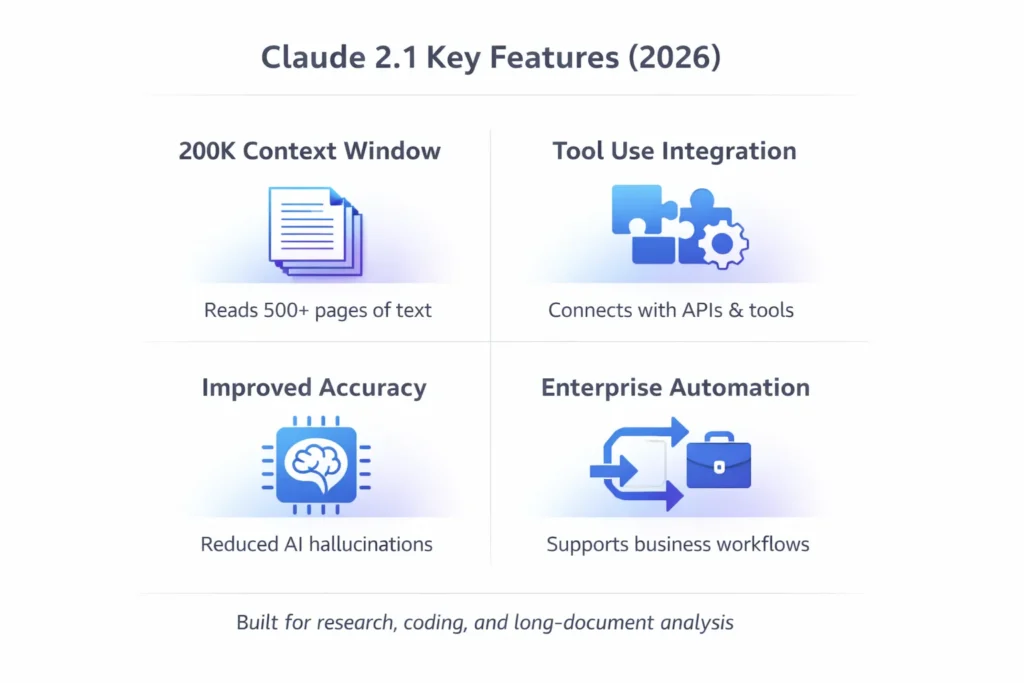
Massive 200K Token Context Window
The most prominent and widely recognized Claude 2.1 feature is its 200,000-token context window.
This represents a dramatic expansion in the amount of information the AI can process during a single interaction.
What Is a Context Window?
A context window refers to the quantity of text an AI model can read, interpret, and remember simultaneously during a conversation or analysis task.
If the context window is small, the AI may lose earlier information as the conversation continues.
However, if the context window is large, the model can maintain awareness of previous content and analyze much larger datasets.
Context Window Comparison
| AI Model | Context Window |
| Claude 2.1 | 200K tokens |
| Claude 2.0 | 100K tokens |
| Typical LLMs | 8K – 32K tokens |
A 200K token window is exceptionally large compared to many traditional language models.
This roughly equals:
- Approximately 150,000 words
- More than 500 pages of written material
- Entire books or technical manuals
What This Feature Enables
Because of this expanded capacity, Claude 2.1 can analyze large and complex information sources such as:
- academic research papers
- corporate financial reports
- legal agreements
- technical documentation
- entire software repositories
Users can upload lengthy files and ask highly specific questions about individual sections.
Real-World Example
Imagine a legal team reviewing a 300-page commercial contract.
Using Claude 2.1, they could upload the full document and ask the AI to:
- summarize critical clauses
- detect legal risks
- Compare provisions with previous agreements
- explain complex legal terminology
This significantly reduces the time required to review and interpret long legal documents.
Reduced Hallucination Rate
Another significant improvement among Claude 2.1 features is the reduction of AI hallucinations.
In artificial intelligence, hallucination refers to situations where a model produces incorrect or fabricated information that Appears convincing but is not factually accurate.
Claude 2.1 incorporates improved training techniques designed to minimize this issue.
Anthropic enhanced several components of the model’s development process, including:
- more refined dataset filtering
- stronger safety alignment training
- improved response verification mechanisms
Why Reduced Hallucinations Matter
Improved factual reliability is essential for professional applications.
Organizations rely on AI tools for tasks that require precise information, such as:
- financial analysis
- academic research
- legal documentation
- enterprise decision support
When AI outputs are more trustworthy, businesses can integrate them into real workflows with greater confidence.
As a result, Claude 2.1 is often considered one of the most dependable AI assistants for knowledge-intensive tasks.
Tool Use (External API Integration)
Another powerful addition to Claude 2.1 is tool use, which enables the model to interact with external systems.
Tool use allows the AI to perform actions beyond simple text generation by communicating with APIs and digital services.
This functionality transforms Claude into a dynamic automation engine.
What Tool Use Allows Claude To Do
With tool integrations enabled, Claude can:
- call external APIs
- retrieve real-time information
- query databases
- trigger automated processes
- communicate with enterprise software systems
These capabilities allow developers to connect Claude with business platforms and automate complex tasks.
Example Tool Use Cases
Businesses may integrate Claude with systems such as:
- customer relationship management platforms
- internal knowledge databases
- analytics dashboards
- project management tools
For instance, Claude could automatically retrieve sales data from a CRM system, analyze performance trends, and generate a summary report for managers.
System Prompts for Developer Control
Claude 2.1 also introduced system prompts, which provide developers with greater control over the AI’s behavior.
System prompts are predefined instructions that shape how the model responds to users.
They can specify the assistant’s role, tone, personality, or communication style.
Example System Prompt
A developer might configure Claude with the following instruction:
“You are a professional legal advisor. Provide structured explanations using formal legal language and cite relevant statutes when appropriate.”
With this configuration, Claude will consistently behave as a legal assistant.
Benefits of System Prompts
System prompts enable developers to:
- create specialized AI assistants
- maintain consistent brand voice
- enforce organizational policies
- guide response formats
This feature is extremely valuable for enterprise AI implementations.
Advanced Long-Document Analysis
Because of its massive context window, Claude 2.1 excels at long-form document analysis.
The model can process Extensive information and extract meaningful insights.
Common tasks include:
- summarizing long reports
- extracting critical data points
- comparing multiple documents
- answering complex questions
Research Example
A researcher could upload multiple academic papers and instruct Claude to:
- summarize key findings
- compare methodologies
- Identify research gaps,
- explain complicated sections
This dramatically reduces the time required for literature review.
Long Conversation Memory
Many AI systems struggle to maintain coherence during extended conversations.
Claude 2.1 solves this issue through its expanded context window, allowing the model to retain information across lengthy dialogues.
This enables users to conduct multi-step discussions and complex projects without repeatedly providing the same instructions.
Developers, researchers, and analysts can maintain continuity throughout long sessions.
Large File Upload Support
Claude 2.1 also allows users to upload files for analysis.
Supported file types include:
- PDF documents
- text files
- spreadsheets
- data reports
The system currently supports files up to approximately 10MB in size.
Example Workflow
A business analyst might upload a market research report and ask Claude to:
- summarize insights
- extract statistics
- identify trends
- generate presentation points
This workflow accelerates research and reporting processes.
Asynchronous Task Processing
Claude 2.1 also supports asynchronous processing, meaning large tasks can run in the background.
Instead of waiting for a long analysis to complete, users can continue working while Claude processes information.
Tasks that benefit from this capability include:
- large document analysis
- dataset interpretation
- research queries
- automation pipelines
This feature enhances productivity for professionals managing heavy workloads.
Claude 2.1 vs Claude 2.0
Understanding the differences between Claude versions helps highlight the improvements introduced in Claude 2.1.
| Feature | Claude 2.0 | Claude 2.1 |
| Context Window | 100K tokens | 200K tokens |
| Tool Use | Limited | Full support |
| System Prompts | Not available | Available |
| Accuracy | Good | Improved |
| Enterprise Integrations | Basic | Advanced |
Major Upgrades in Claude 2.1
The most important improvements include:
- doubled context capacity
- expanded developer tools
- improved response accuracy
- stronger enterprise integrations
These enhancements make Claude 2.1 significantly more powerful for professional applications.
How Claude 2.1 Works
Claude 2.1 operates using advanced machine learning architectures known as transformer neural networks.
Transformers analyze language using an attention mechanism that identifies relationships between words and concepts across long text sequences.
This architecture allows the model to understand meaning, context, and intent within complex sentences.
The underlying concept was introduced in the research paper “Attention Is All You Need.”
Technologies Used in Claude 2.1
Claude combines several artificial intelligence technologies, including:
- transformer neural networks
- natural language processing
- reinforcement learning alignment
- large-scale training datasets
Together, these technologies allow the system to generate coherent responses and analyze intricate information structures.
Real-World Use Cases of Claude 2.1
Claude 2.1 is applied across many industries and professional environments.
Research and Academia
Researchers use Claude to accelerate literature reviews and analyze academic publications.
Common uses include:
- summarizing research papers
- extracting experimental insights
- Simplifying complex theories
- identifying trends in scientific data
Software Development
Developers often rely on Claude as a programming assistant.
Typical use cases include:
- debugging software
- explaining algorithms
- generating documentation
- analyzing large codebases
Business Automation
Organizations use Claude to automate repetitive administrative tasks.
Examples include:
- financial report analysis
- meeting summarization
- customer support automation
- data-driven insights generation
Content Creation
Writers and marketers also use Claude for content production.
Typical tasks include:
- blog article drafting
- SEO research
- editing and rewriting
- brainstorming content ideas
Because Claude remembers extended conversations, it performs well during long writing sessions.
Pros and Cons
Like any technology, Claude 2.1 has both advantages and limitations.
Pros
Massive 200K context window
Excellent long-document analysis
Powerful API integrations
Customizable system prompts
Strong safety architecture
Enterprise-ready design
Cons
Limited multimodal capabilities compared with some AI models
Large prompts may increase response time
Advanced features require Developer access
File upload limits
Who Should Use Claude 2.1?
Claude 2.1 is particularly valuable for professionals who work with large amounts of textual information.
Best Users
- researchers
- developers
- business analysts
- legal professionals
- content creators
Ideal Use Cases
Claude 2.1 works best for:
- long-document analysis
- research paper summarization
- coding assistance
- enterprise automation
Organizations handling large knowledge bases benefit most from its capabilities.
FAQs
A: The main Claude 2.1 features include a 200K token context window, tool use for external integrations, system prompts for developer customization, improved factual accuracy, long-document analysis, and enterprise automation capabilities.
A: Claude 2.1 supports a 200,000-token context window, which equals roughly 150,000 words or more than 500 pages of text.
A: Claude 2.1 improves upon Claude 2.0 by offering:
double context capacity
tool integrations for automation
developer system prompts
improved accuracy and reliability
A: Developers can integrate Claude using the Claude API to build AI applications, automated systems, and intelligent productivity tools.
A: Claude 2.1 is best for:
long-document analysis
academic research
coding assistance
enterprise automation
Conclusion
Claude 2.1 represents a major step forward in the evolution of modern artificial intelligence systems. With its Advanced architecture, expanded capabilities, and enterprise-focused tools, it has become one of the most powerful large language models available today.
The most notable improvement in Claude 2.1 is its massive 200K token context window, which allows the AI to analyze extremely long documents, maintain extended conversations, and process large datasets more effectively than many traditional language models. This capability alone makes Claude highly valuable for professionals who work with research papers, legal documents, technical manuals, and complex business reports.