Introduction
Artificial intelligence APIs have rapidly become the foundation of modern software development. From intelligent chatbots and digital Assistants to automated document processing platforms and advanced research tools, developers increasingly rely on large language models (LLMs) to automate sophisticated tasks and enhance user experiences.
In today’s AI ecosystem, one of the most powerful platforms available to developers is the Anthropic Claude API. This API allows engineers and software teams to integrate the Claude family of AI models directly into their applications, systems, and digital services.
Through the Claude API, developers can access several advanced models,s including Claude 3 Opus, Claude 3 Sonnet, and Claude 3 Haiku. These models can perform complex reasoning, generate human-like text, analyze large documents, write and debug code, summarize reports, translate languages, and maintain natural conversational interactions.
Because of its large context window and strong alignment features, Claude has become especially popular for enterprise-grade applications, SaaS products, AI copilots, and research assistants.
This Claude 2 API guide explains everything developers need to know to start building with Claude. Whether you are a beginner experimenting with artificial intelligence or an experienced engineer creating production-level AI systems, this tutorial walks through the complete development workflow.
In this guide, you will learn:
- How the Claude API works
- How to get API access
- Authentication and request structure
- Python and JavaScript examples
- Streaming responses
- Pricing and token usage
- Real-world applications
- Best practices and troubleshooting
By the end of this tutorial, you will understand how to integrate Claude AI into real applications such as conversational agents, intelligent assistants, document analyzers, knowledge retrieval systems, and automated research platforms.
What is the Claude 2 API?
The Claude 2 API is a developer interface that allows software systems to communicate with Claude AI models programmatically.
Instead of interacting with Claude through a traditional web interface or chat dashboard, developers can send prompts directly from their software applications and receive machine-generated responses through structured API requests.
This approach enables developers to build intelligent platforms capable of processing natural language, generating text, analyzing information, and automating complex workflows.
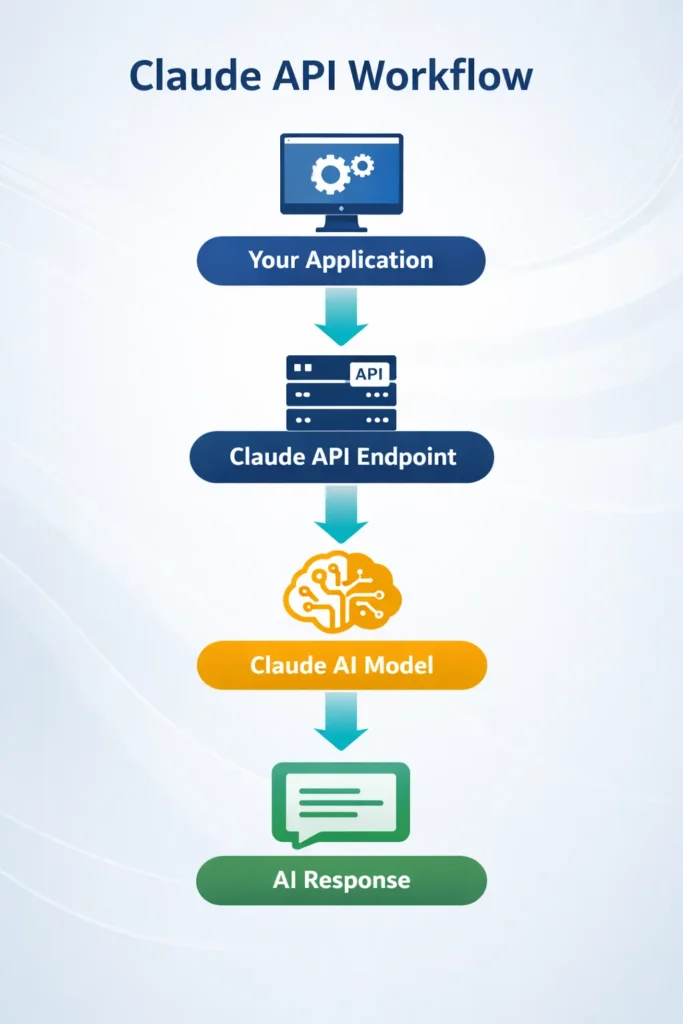
In simple terms, the API acts as a bridge between your application and the Claude AI model.
Developers commonly use the Claude API to:
- Build AI chatbots
- Generate written content automatically
- Analyze documents and reports
- Write and debug software code
- Create AI research assistants
- Automize repetitive workflows
- Build AI-powered SaaS platforms
The Claude API follows a REST-based architecture, which means applications send HTTP requests to Claude endpoints and receive responses formatted as structured JSON data.
This standardized design makes integration relatively straightforward and allows developers to embed Claude into many different systems, including:
- Web applications
- SaaS platforms
- Mobile applications
- AI agents
- Enterprise software solutions
- Knowledge management tools
- Developer automation pipelines
Because the API is language-agnostic, it can be used with virtually any programming language capable of sending HTTP requests.
Claude API Architecture Explained
Understanding the architecture behind the Claude API helps developers design reliable, scalable, and efficient AI systems.
At its core, the Claude API operates through a request-response pipeline.
Your application sends a request containing a prompt and configuration parameters. The Claude model processes the input and generates an intelligent response, which is then returned to your system.
Core Components of the Claude API
The Claude API consists of several core elements that work together to enable intelligent responses.
| Component | Description |
| API Key | Authenticates requests from your application |
| Messages API | Primary endpoint used for conversation workflows |
| Token Processing | Converts text into tokens for AI computation |
| Model Engine | Claude models generate responses |
| JSON Response | Structured output returned to the application |
Each component plays a crucial role in ensuring that the AI model can interpret prompts and generate meaningful outputs.
This modular architecture allows developers to build scalable AI systems capable of handling large volumes of requests.
How the Anthropic API Works
The Anthropic API offers structured endpoints designed to handle different AI tasks.
Each API request usually includes several important parameters that define how the model should generate its response.
Typical request elements include:
- Model selection
- User messages
- Token limits
- Temperature or randomness setting
- Additional parameters
These parameters allow developers to customize how the AI behaves.
Example Request Flow
- A user submits a question through an application
- The application sends an API request to Claude
- Claude processes the prompt using its language model
- The AI generates a response
- The result is returned to the application
This workflow enables developers to create real-time AI experiences inside software products and digital services.
Claude API Authentication
Every request sent to the Claude API must include authentication headers.
These headers verify the identity of the requesting application.
Claude API Endpoints Explained
The Claude API provides multiple endpoints designed for different tasks.
Messages API
The Messages API is the primary endpoint used for conversational interactions and prompt-response workflows.
Endpoint:
POST /v1/messages
Use Cases
- Chatbots
- AI assistant
- Content generation
- Question answering
- Coding assistance
Message Batches API
This endpoint processes large volumes of requests asynchronously.
Instead of sending Requests individually, developers can submit batches for large-scale processing.
Best For
- Dataset analysis
- Bulk AI tasks
- Data processing pipelines
- Document processing systems
Token Counting API
Token counting allows developers to estimate token usage before sending requests.
Benefits
- Prevent token limit errors
- Estimate API cost
- Optimize prompts
Streaming Responses with Claude API
Streaming allows applications to receive responses incrementally instead of waiting for the entire output.
Instead of returning the complete response at once, the API delivers text token by token.
Benefits of Streaming
- Faster interface updates
- Real-time responses
- Better conversational experience
- Improved application responsiveness
Streaming is commonly used in chat interfaces and interactive AI assistants.
Claude API Pricing and Token Usage
Claude API pricing depends on several factors.
Pricing typically varies based on:
- Model used
- Number of input tokens
- Number of output tokens
Example Pricing Structure
| Model | Input Cost | Output Cost | Best For |
| Opus | High | High | Advanced reasoning |
| Sonnet | Medium | Medium | Balanced workloads |
| Haiku | Low | Low | Fast responses |
Developers should regularly monitor token usage to control API costs.
Claude Models Explained
Offers multiple AI models optimized for different workloads.
Claude Opus
The most powerful model in the Claude family.
Best For
- Advanced reasoning
- Research tasks
- Complex analysis
- High-level coding
Claude Sonnet
Claude Sonnet provides a balanced combination of speed and intelligence.
Best For
- AI assistants
- Content generation
- Coding tasks
- SaaS applications
Claude Haiku
Claude Haiku is designed for speed and efficiency.
Best For
- Chatbots
- High-volume applications
- Fast responses
Building Real Applications with Claude API
Developers are using the Claude API to create powerful AI systems across many industries.
AI Chatbots
Claude can power intelligent conversational agents capable of answering complex questions.
Use Cases
- Customer support automation
- Knowledge base assistants
- Virtual agents
Document Analysis
Claude is especially effective at analyzing large documents due to its large context window.
Examples include:
- Research papers
- Legal contracts
- Financial reports
- Technical documentation
Code Generation
Developers can use Claude to:
- Generate code
- Debug software
- Write documentation
- Review pull requests
AI Research Assistants
Claude can analyze large datasets and summarize complex information quickly.
Researchers use AI assistants to accelerate knowledge discovery.
Claude API vs OpenAI API
Developers frequently compare the Claude API with other AI platforms such as OpenAI.
Feature Comparison
| Feature | Claude API | OpenAI API |
| Context Window | Up to 200K+ tokens | Smaller for many models |
| Safety Focus | Strong alignment | Moderate |
| Coding Ability | Strong | Strong |
| Document Processing | Excellent | Good |
Claude is particularly strong in long document analysis and complex reasoning tasks.
Claude API Rate Limits
Rate limits protect the system from overload and ensure fair usage among developers.
Typical limits include:
- Requests per minute
- Tokens per minute
- Concurrent requests
Best Practices
- Implement request queues
- Use exponential backoff
- Monitor usage metrics
These techniques help maintain reliable performance.
Best Practices for Claude API
To build efficient applications with the Claude API, developers should follow several best practices.
Optimize Prompts
Clear prompts produce better AI responses.
Example:
Bad prompt
Explain AI
Better prompt
Explain artificial intelligence in simple terms with real-world examples.
Monitor Token Usage
Tracking tokens helps manage costs and optimize performance.
Cache Responses
If users frequently ask similar questions, caching responses can reduce API calls.
Implement Error Handling
Applications should gracefully handle errors such as:
- Rate limit errors
- Invalid requests
- Token limit errors
Proper error handling improves Reliability.
Claude API Troubleshooting
Developers may occasionally encounter issues when using the API.
Invalid API Key
Ensure the API key is correctly configured in environment variables.
Token Limit Errors
Reduce prompt length or split large documents into smaller sections.
Rate Limit Errors
Implement retry logic using exponential backoff.
Pros and Cons
Understanding the advantages and limitations helps developers choose the right AI platform.
Pros
- Large context window
- Strong reasoning capabilities
- Excellent document analysis
- Flexible API integration
- Strong safety alignment
Cons
- Advanced models may be expensive
- Prompt optimization is required
- Rate limits for high-volume usage
FAQs
A: Claude provides limited free usage for testing, but production usage generally requires a paid plan.
A: Any language capable of sending HTTP requests can use the API, including:
Python
JavaScript
Java
Go
Rust
A: Claude supports extremely large context windows, which makes it ideal for analyzing long documents and research reports.
A: Claude is widely used for building conversational agents, virtual assistants, and AI chat systems.
Conclusion
The Claude API is one of the most powerful platforms available for developers building AI-powered applications.
With advanced language models, large Context windows, and flexible integration capabilities, Claude allows developers to create intelligent systems capable of reasoning, coding, document analysis, and natural conversation.
This Claude 2 API guide covered everything from API setup and authentication to Python and JavaScript integration, streaming responses, pricing, and real-world use cases.
By understanding how tokens, models, and endpoints work, developers can build scalable AI applications that deliver real value to users.