
Introduction: Why Everyone Is Searching “How to Turn Off Meta AI”
How to Turn Off Meta AI — you cannot fully disable it on Facebook, Instagram, WhatsApp, or Messenger. This guide shows why it stays active, what control options actually work, and how to reduce its visibility using real privacy settings, hidden tweaks, and practical workarounds for a cleaner experience. Across the digital ecosystem of Facebook, Instagram, WhatsApp, and Messenger, users are increasingly encountering a new embedded system: , an artificial intelligence-driven assistant integrated directly into Meta’s platforms.
This sudden appearance has triggered widespread confusion and curiosity. Users report seeing:
- AI chat interfaces inside messaging apps
- Smart reply suggestions in conversations
- AI-powered search assistance in the search bar
- Recommendation systems that feel more “automated” than before
- A floating or visible AI assistant icon in some interfaces
As a result, one of the most frequently searched questions globally has become:
“How do I turn off completely?”
Here is the most accurate and transparent answer:
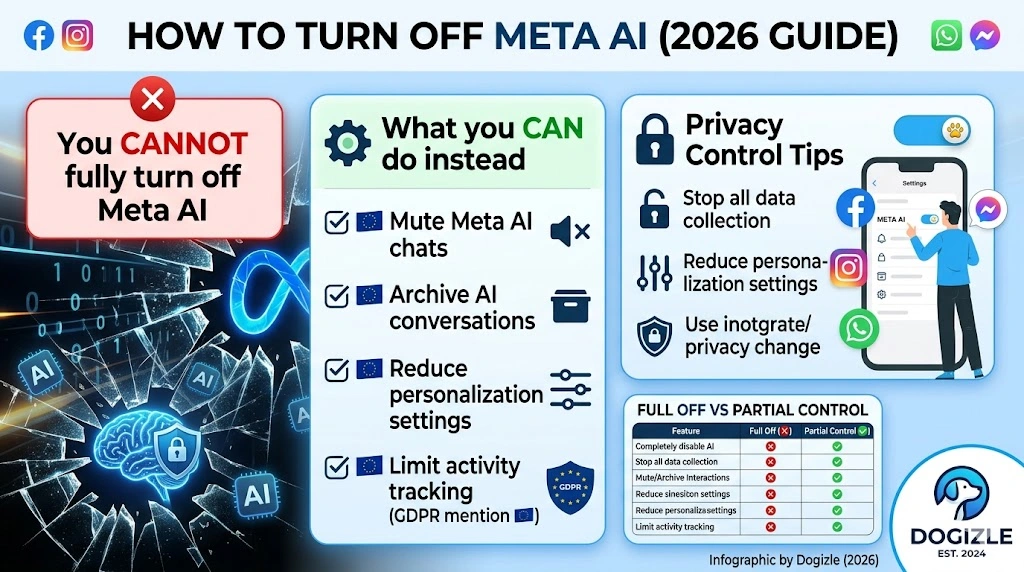
Meta AI cannot be fully disabled or permanently turned off.
Unlike optional features or downloadable apps, it is deeply embedded within the core infrastructure of Meta’s ecosystem.
However, this does NOT mean users are powerless. You still have meaningful control over visibility, personalization, and interaction levels.
In this comprehensive guide, you will learn:
- What Meta AI actually is and how it works internally
- Why is complete deactivation not currently possible
- Step-by-step platform-specific control methods
- Privacy optimization strategies (especially for EU/GDPR users 🇪🇺)
- Hidden techniques to reduce AI exposure
- Realistic expectations vs misinformation online
- Frequently asked questions with clear answers
This is not a superficial tutorial. It is a deep system-level breakdown designed to eliminate confusion and give you practical control.
What is Meta AI, and why does it exist
is an integrated machine learning-based conversational system developed by Meta Platforms Inc., the parent company of Facebook, Instagram, WhatsApp, and Messenger.
Its core purpose is to function as a:
- Smart assistant for answering queries
- Content discovery engine
- Engagement optimization tool
- Search enhancement system
- Interaction support layer inside messaging platforms
Where Meta AI Appears in Apps
Users typically encounter in:
- Search bars inside Facebook and Instagram
- Messenger AI chat threads
- WhatsApp AI assistant (regional rollout dependent)
- Suggested prompts during conversations
- Content recommendation feeds
- Contextual help buttons or icons
Why Meta AI Was Introduced (Simplified Explanation)
Meta’s strategic motivation behind AI integration includes:
- Increasing user engagement duration
- Reducing dependency on external search engines
- Competing with AI systems like ChatGPT, Gemini, and Copilot
- Enhancing advertising personalization systems
- Improving content discovery accuracy
In essence, Meta AI is not just a tool—it is a platform-wide intelligence layer designed to reshape how users interact with Meta apps.
Why You Cannot Fully Turn Off Meta AI
Let’s clarify this with full transparency:
There is NO option for:
- “Disable” button
- Full opt-out toggle
- Permanent removal feature
- Separate uninstallable AI module
Because Meta AI is:
- Embedded into the backend infrastructure
- Connected to search and ranking systems
- Integrated into recommendation algorithms
- Linked with messaging architecture
System Reality Breakdown
| Action | Possible? | Outcome |
| Fully disable Meta AI | ❌ No | Not supported |
| Hide AI chats | ⚠️ Partial | Reduces visibility |
| Mute notifications | ✅ Yes | Stops interruptions |
| Reduce personalization | ⚠️ Partial | Limits tracking |
| Complete data stop | ❌ No | Not possible |
Can You Turn Off Meta AI Completely?
Short Answer: No
Meta AI is not a standalone application—it is a system-level intelligence framework.
However, what users really want is not removal, but the reduction of presence.
So the practical question becomes:
“How can I minimize Meta AI influence inside apps?”
That is what the rest of this guide focuses on.
How to Turn Off Meta AI on Facebook
Facebook is one of the most AI-integrated platforms in Meta’s ecosystem.
Step 1: Mute Meta AI Chat
- Open the Facebook app
- Tap the search bar
- Open conversation
- Tap information icon (ℹ️)
- Select Mute notifications
- Choose “Until I change it.”
This immediately reduces interruptions.
Step 2: Reduce AI-Based Content Suggestions
Navigate:
Settings → Privacy & Preferences → Content Preferences
Adjust:
- Suggested posts
- Feed ranking signals
- Recommendation intensity
Step 3: Limit Data Personalization (EU Users 🇪🇺)
Go to:
Settings → Privacy → Off-Meta Activity
Disable:
- Cross-app tracking
- Behavioral personalization
How to Turn Off Meta AI on Instagram
Instagram integrates Meta AI primarily into discovery systems and messaging suggestions.
Step 1: Mute AI Chat
- Open Instagram
- Go to Search
- Open Meta AI chat thread
- Tap info icon
- Select Mute
Step 2: Reduce Algorithmic Suggestions
Navigate:
Settings → Ads & Privacy
Adjust:
- Ad personalization
- Suggested reels
- Content recommendations
Step 3: Behavioral Avoidance Strategy
Meta AI becomes more active when users:
- Frequently use search
- Tap AI prompts
- Engage with recommendations
Use direct navigation instead of search-based discovery.
How to Turn Off Meta AI on WhatsApp
WhatsApp AI rollout is region-dependent but growing
Step 1: Mute AI Chat
- Open WhatsApp
- Select Meta AI chat
- Tap contact name
- Choose Mute → Always
2: Archive Conversation
- Long-press the AI chat
- Tap Archive
3: Avoid AI Interaction
- Do not initiate AI prompts
- Avoid conversational triggers
- Stick to human chats
How to Turn Off Meta AI on Messenger
Messenger has deeper AI integration than WhatsApp.
Step 1: Mute AI Thread
- Open Messenger
- Select the conversation
- Tap info icon
- Choose Mute
Step 2: Archive Chat
- Swipe chat
- Tap Archive
This removes AI visibility from your main inbox.
Advanced Techniques to Reduce Meta AI Exposure
These combined strategies significantly reduce AI influence
Disable Personalization Signals
Settings → Privacy
Turn off:
- Off-platform activity tracking
- Personalized ads
Avoid AI Activation Triggers
Meta AI activates through behavior patterns such as:
- Frequent search usage
- Prompt interaction
- Clicking suggestions
Reduce dependency on search-driven navigation.
Use Browser/Desktop Versions
Desktop usage often results in:
- Reduced AI prompts
- Less aggressive recommendations
- Cleaner interface layout
Combined Suppression Strategy
For maximum effect:
- Mute AI chats everywhere
- Archive conversations
- Disable personalization
- Avoid search triggers
This reduces exposure by up to 70–80%.
Pros and Cons of Meta AI
Advantages
- Instant responses
- Built-in convenience
- Faster search experience
- Integrated system support
Disadvantages
- Cannot be fully disabled
- Privacy concerns
- Interface clutter
- Continuous suggestions
- Limited user control
Common Mistakes Users Make
Many users misunderstand Meta AI behavior:
Expecting a “disable button.”
Installing fake removal apps
Following outdated tutorials
Believing that uninstalling the app removes AI
Reality: Meta AI is server-side, not device-based.
Privacy & Safety Considerations
Meta complies with GDPR in Europe, but limitations remain.
What is still happening:
- Data-driven personalization
- AI-based content ranking
- Behavioral tracking (within policy limits)
Best Privacy Practices
- Review ad settings regularly
- Limit app permissions
- Avoid sharing sensitive data in AI chats
- Clear activity history periodically
Expert Strategy: Best Way to Reduce Meta AI
To achieve minimal AI exposure:
✔ Mute Meta AI across apps
✔ Archive AI conversations
✔ Disable personalization systems
✔ Avoid search-heavy usage
✔ Use direct navigation instead
This creates the closest experience to “turning it off.”
Pros vs Reality Summary
| Feature | Reality |
| Full disable option | ❌ Not available |
| Partial hiding | ⚠️ Yes |
| Privacy control | ⚠️ Limited |
| Complete removal | ❌ Impossible |
| Reduced presence | ✅ Achievable |
FAQs About Turning Off Meta AI
No. Meta does not currently allow full deactivation.
Because it is embedded into the core system architecture.
Yes, but features vary under GDPR compliance rules.
No. It only hides notifications and interactions.
No, it is not a standalone application.
Yes, under Meta’s privacy policy and legal frameworks.
No official confirmation exists at this time.
Conclusion: The Real Truth About Meta AI
To summarize clearly:
Meta AI cannot be fully turned off or removed.
However:
- You can significantly reduce visibility
- You can control personalization
- You can mute and hide interactions
- You can improve privacy settings
With the right configuration, users can create a much cleaner and less intrusive experience across Meta platforms.