Introduction
The AI landscape in 2026 is evolving faster than ever, with users increasingly shifting toward local AI models for privacy and performance. One of the most searched topics is how to Run DeepSeek Locally, especially among developers and researchers who want full control over their data and workflows. At the same time, conversational AI tools like Grok are gaining attention due to their integration with real-time web data and trending queries—including controversial NSFW-related searches that often appear in online discussions.
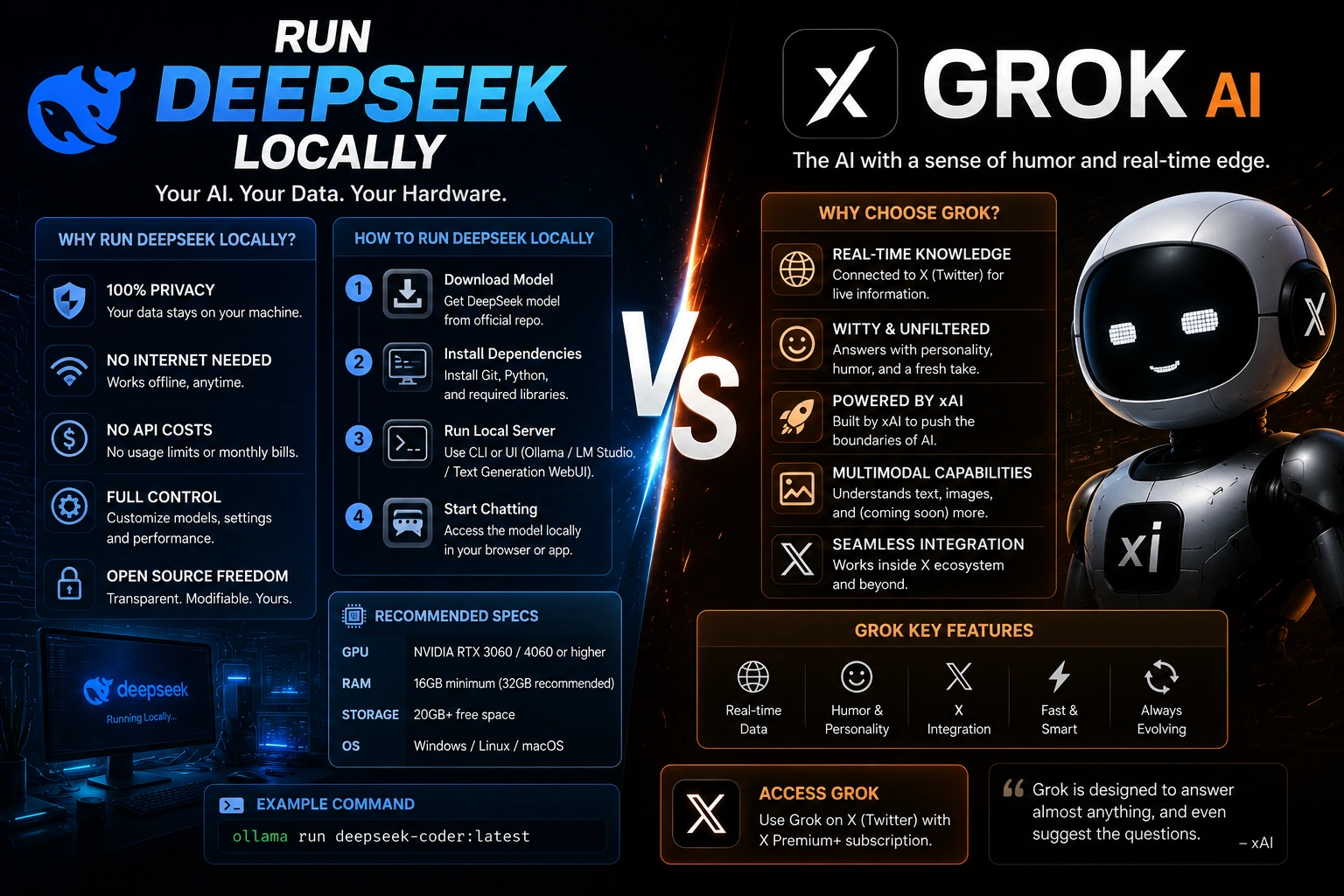
However, comparing these two concepts directly requires clarity. DeepSeek focuses on local deployment, offline access, and customization, while Grok is a cloud-based AI assistant optimized for real-time interaction and web intelligence.
This article provides a clean, structured, and SEO-focused breakdown of both sides: how to run DeepSeek locally, how Grok behaves in real-world usage, performance differences, safety considerations, and why these tools are fundamentally designed for different audiences. You’ll also get installation steps, hardware requirements, and a practical comparison table designed for beginners and professionals alike.
What Does “Run DeepSeek Locally” Mean?
Running DeepSeek locally means installing and executing the model directly on your own device instead of relying on cloud servers.
Key Concepts:
- No internet required after setup
- Full data Privacy
- Offline AI usage
- Custom model control
Why Users Prefer Local AI:
- Data security (no external API calls)
- Zero monthly cost
- Developer flexibility
- Faster response in optimized setups
Grok AI Overview & NSFW Query Context
Grok is a cloud-based AI assistant designed for real-time responses and social media integration.
Important Clarification:
Some users associate Grok with NSFW or adult-themed queries due to its open conversational style and real-time internet access. However:
- It is not designed as an adult-content generator
- NSFW-related searches are a byproduct of user behavior trends
- Content policies still apply depending on platform settings
This article does NOT cover explicit content. Instead, it focuses on safe AI usage and system behavior differences.
DeepSeek Local Setup Guide
Step 1: Install Ollama
Most users run DeepSeek locally using Ollama.
- Download Ollama
- Install on Windows / Mac / Linux
- Open terminal
Step 2: Run DeepSeek Model
ollama run deepseek-r1:8b
This downloads and Launches the model automatically.
Step 3: Start Using AI Offline
- Type prompts in the terminal
- Get instant responses
- No cloud dependency
Step 4: Optional API Setup
Local API endpoint:
http://localhost:11434/v1
Supports Python, Node.js, and web apps.
Hardware Requirements for DeepSeek Local Use
| Model Size | Performance | RAM Needed | GPU Requirement |
| 1.5B | Basic | 8–16 GB | Not required |
| 7B | Good | 16 GB | Optional GPU |
| 14B | Strong | 32 GB | RTX 3060+ |
| 32B | Advanced | 64 GB+ | RTX 4090+ |
DeepSeek vs Grok: Core Differences
Architecture
- DeepSeek → Local / Open-weight model
- Grok → Cloud-based AI system
Data Privacy
- DeepSeek → Fully private
- Grok → Server-based processing
Internet Access
- DeepSeek → Offline capable
- Grok → Real-time online data
Customization
- DeepSeek → High (fine-tuning possible)
- Grok → Limited user control
Performance Comparison Table
| Feature | DeepSeek Local | Grok AI |
| Speed | Depends on hardware | Very fast |
| Privacy | High | Medium |
| Offline Use | Yes | No |
| Real-time Data | No | Yes |
| Cost | Free | Freemium/paid tiers |
| Customization | Advanced | Limited |
Pros & Cons Section
DeepSeek Local (Pros)
- Full privacy control
- No API costs
- Works offline
- Developer-friendly
Cons:
- Requires hardware setup
- Large models need a GPU
- Manual installation complexity
Grok AI (Pros)
- Real-time responses
- Easy to use (no setup)
- Integrated web intelligence
- Fast cloud processing
Cons:
- Requires internet
- Data processed externally
- Limited offline capability
Why Users Compare These Two Systems
Users often compare DeepSeek local setups with Grok AI because they represent two opposite AI philosophies:
- Local AI = privacy + control
- Cloud AI = speed + convenience
This creates confusion when mixed with trending NSFW search topics, which are not technically relevant to AI performance but affect search popularity.
How to Use These AI Tools Safely
DeepSeek Local Usage Tips
- Use quantized models for low-end PCs
- Monitor RAM usage
- Prefer smaller models for laptops
Grok AI Usage Tips
- Avoid sensitive prompts
- Use for research and productivity
- Verify information from sources
Tips to Write Better AI Tool Content
- Focus on user intent, not hype
- Avoid mixing unrelated topics
- Use comparison tables for clarity
- Keep technical accuracy high
- Target beginner-friendly explanations
Europe-Focused AI Usage Insights
In Europe (especially Germany, France, and the Netherlands), users prefer:
- Data privacy-first AI tools
- Local model deployment (GDPR compliance concerns)
- Open-source AI systems like DeepSeek
Meanwhile, cloud tools like Grok are popular for:
- Research workflows
- Social media analysis
- Fast content generation
FAQs
A: Yes, but only smaller models like 1.5B or 7B. Performance depends on RAM and CPU strength.
A: Not directly. DeepSeek is better for privacy and offline use, while Grok is better for real-time information.
A: No, Grok requires an internet connection to function.
A: Yes, most DeepSeek models are open-weight and free for local use.
A: DeepSeek is better for local development and customization, while Grok is better for fast online research.
Conclusion
The comparison between running DeepSeek locally and using Grok AI highlights two completely different approaches to artificial intelligence. DeepSeek is designed for users who prioritize privacy, offline access, and full system control. It is ideal for developers, researchers, and advanced users who want to build AI workflows without relying on external servers.
On the other hand, Grok focuses on cloud-based Intelligence, real-time data access, and ease of use. It removes the technical barriers of installation but requires constant internet connectivity and external data processing.
The key takeaway is that these tools are not direct competitors—they serve different needs. DeepSeek empowers local AI freedom, while Grok enhances real-time conversational intelligence.
For users in Europe and beyond, the decision depends on whether privacy and control matter more than convenience and speed. Understanding these differences helps you choose the right AI ecosystem for your workflow in 2026.